Canceling Notta is easy once you cancel in the right place.
Rule 1: You must cancel where you subscribed:
- Notta Web (paid on notta.ai or app.notta.ai)
- Apple App Store (iPhone or iPad)
- Google Play (Android)
Rule 2: Uninstalling the app or deleting your Notta account does not automatically stop billing.
Official site: Notta
10-second check: where did you subscribe?
Pick the one that matches you:
If you subscribed on Notta Web
You likely paid with a card on the Notta website and manage billing inside your account.
Go to Method A (Notta Web) below.
If you subscribed on iPhone or iPad
You likely see Notta in your Apple subscriptions list.
Go to Method B (App Store) below.
If you subscribed on Android
You likely see Notta under Google Play subscriptions.
Go to Method C (Google Play) below.
What happens after you cancel? (quick, plain English)
- Canceling usually turns off auto-renew.
- You can usually keep access until the end of the current billing period.
- If you cancel too close to renewal, you might still be charged, so cancel early.
More detail here: Notta pricing and refunds
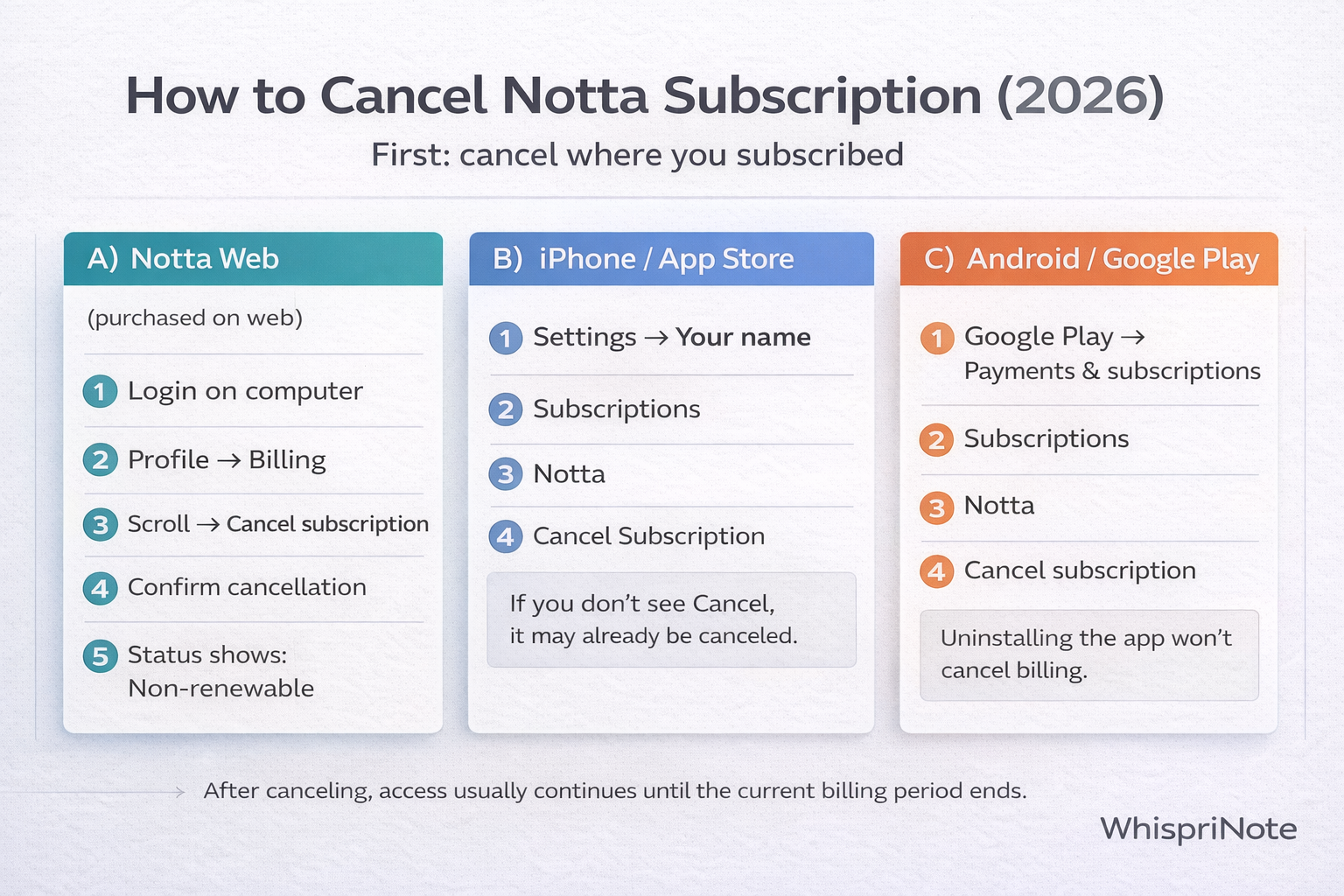
Method A) Cancel Notta subscription on Notta Web (computer)
Use this if you purchased on Notta's website.
- Log in to Notta on a computer
- Click your Profile (top-right) -> Billing
- Scroll to the bottom -> click Cancel subscription
- Confirm: Cancel subscription
- Look for a status change like Auto-renewal -> Non-renewable
If you do not see Billing
Try:
- logging into the correct Notta account (email you used to pay)
- checking that you are in the right workspace or profile
Method B) Cancel Notta subscription on iPhone (App Store)
Use this if you subscribed through Apple.
- Open Settings
- Tap your name (Apple Account)
- Tap Subscriptions
- Tap Notta
- Tap Cancel Subscription (you may need to scroll)
If you do not see a Cancel button, it may already be canceled, or you are signed into a different Apple Account.
Tip: Search your email for Apple receipts to confirm which Apple Account was used.
Method C) Cancel Notta subscription on Android (Google Play)
Use this if you subscribed through Google Play.


