Remember that sinking feeling when you realize you missed an important detail during a lecture? Or when you're so busy scribbling notes that you can't focus on what the professor is actually saying?
You're not alone. Students and professionals everywhere face this same challenge. The good news? AI that records lectures and takes notes is changing the game.
Let's break down how these tools work and why they might be exactly what you need.
What is an AI Lecture Note Taker?
An AI lecture note taker is a smart tool that listens to your lectures and creates organized notes for you. Think of it as having a super-attentive assistant who never gets tired or distracted.
These tools do more than just record audio. They listen, understand, and organize information into readable notes. Some even highlight key concepts and create summaries automatically.
The technology has come a long way from simple voice recorders. Today's AI tools can identify different speakers, filter out background noise, and even understand complex technical terms.
Here's what makes them special: they free you up to actually engage with the content instead of frantically writing everything down.
The Technology Behind AI Lecture Note Takers
You might wonder what makes these tools so smart. Three main technologies work together to transform spoken words into organized notes.
Speech Recognition: The Foundation
Every AI lecture note taker starts with speech recognition. This technology converts spoken words into written text.
IBM's speech-to-text technology explains how modern systems achieve remarkable accuracy rates. The process happens in real-time, capturing every word as it's spoken.
The system breaks down audio into tiny segments. Each segment gets analyzed and matched against vast databases of language patterns. The AI learns from millions of voice samples to understand different accents, speaking speeds, and pronunciations.
[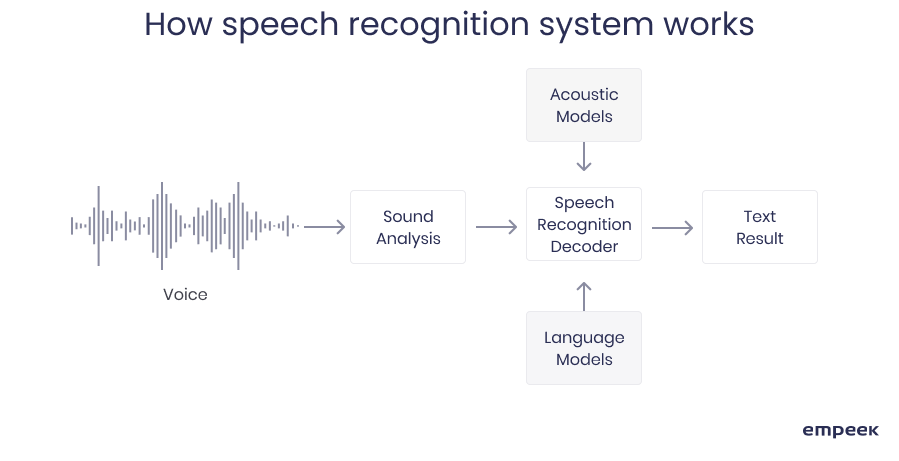 Source: Empeek
Here's the cool part: the more you use these tools, the better they get at understanding your specific lectures and terminology.
Natural Language Processing: Making Sense of Words
Raw transcription is just the first step. Natural Language Processing (NLP) is where the magic happens.
NLP helps AI understand context and meaning. It can tell the difference between "principal" and "principle" based on how they're used. It recognizes when a professor is introducing a new concept versus giving an example.
According to research published in Data Intelligence from MIT, NLP systems can now identify key themes, extract main ideas, and even understand the relationship between different concepts.
The video above shows how NLP techniques work to summarize text. The same principles apply when an AI tool processes your lecture content.
Machine Learning: Getting Smarter Over Time
Machine learning ties everything together. The AI learns patterns from each lecture it processes.
It figures out what information matters most. It recognizes lecture structures (introduction, main points, conclusion). Over time, it adapts to your preferences and note-taking style.
This learning process never stops. Each lecture makes the system a little bit smarter.
Step-by-Step: How AI That Records Lectures and Takes Notes Works
Let's walk through exactly what happens when you use an AI to take lecture notes.
Step 1: Audio Capture
First, the AI needs to hear the lecture. You can record through your device's microphone, upload pre-recorded files, or even connect to live streams.
Audio quality matters here. Better sound means more accurate transcription. Most tools work best with clear audio and minimal background noise.
Step 2: Real-Time Transcription
As the lecture happens, the AI converts speech to text instantly. This is where that speech recognition technology kicks in.
The system identifies different speakers. It timestamps each section. It even handles technical jargon and subject-specific vocabulary.
Some tools let you see the transcription happening in real-time. You can follow along and spot any errors as they occur.
Step 3: Content Analysis
Here's where AI that takes lecture notes becomes really useful. The system doesn't just transcribe. It analyzes.
The AI identifies which points are most important. It recognizes topic changes and section breaks. It filters out "um," "uh," and other filler words that clutter up notes.
The system builds a mental map of the lecture's structure. Main topics, supporting details, examples... it sorts everything into the right categories.
Step 4: Organization and Summary
Next, the AI organizes everything into readable notes. It creates headers and subheaders. It groups related information together.
Many tools generate summaries automatically. You get both detailed notes and quick overviews. Need to review before an exam? The summary gives you the highlights.
Some systems even create bullet points, number lists, and other formatting to make notes easier to scan.
Step 5: Output and Export
Finally, you get your notes in whatever format works best for you. Most tools offer multiple options: PDF, Word documents, plain text, or direct upload to note-taking apps.
You can search through your notes, share them with classmates, or edit them to add your own insights. The notes become a starting point that you can build on.
.svg)
Key Features of AI That Takes Lecture Notes
Different AI lecture note takers offer different features. Here's what sets the best ones apart.
Real-Time Processing: Some tools work live during lectures. Others process recordings after class ends. Real-time tools let you review and correct mistakes as they happen.
Timestamp Markers: Click a timestamp to jump straight to that exact moment in the recording. Perfect when you need to review confusing sections or missed details.
Action Item Extraction: Smart tools automatically spot tasks, assignments, and due dates mentioned during lectures. No more forgotten deadlines.
Multi-Language Support: Many AI tools handle dozens of languages. Great for language classes or international students studying abroad.

