If you searched how to cancel Noteey subscription, you are probably trying to do one of these:
- Stop auto-renew on the Premium Plan (monthly or yearly)
- Cancel during a trial
- Confirm you will not be charged again
- Figure out refunds if you just paid
This guide is written to be fast and practical (no fluff).
Quick answer
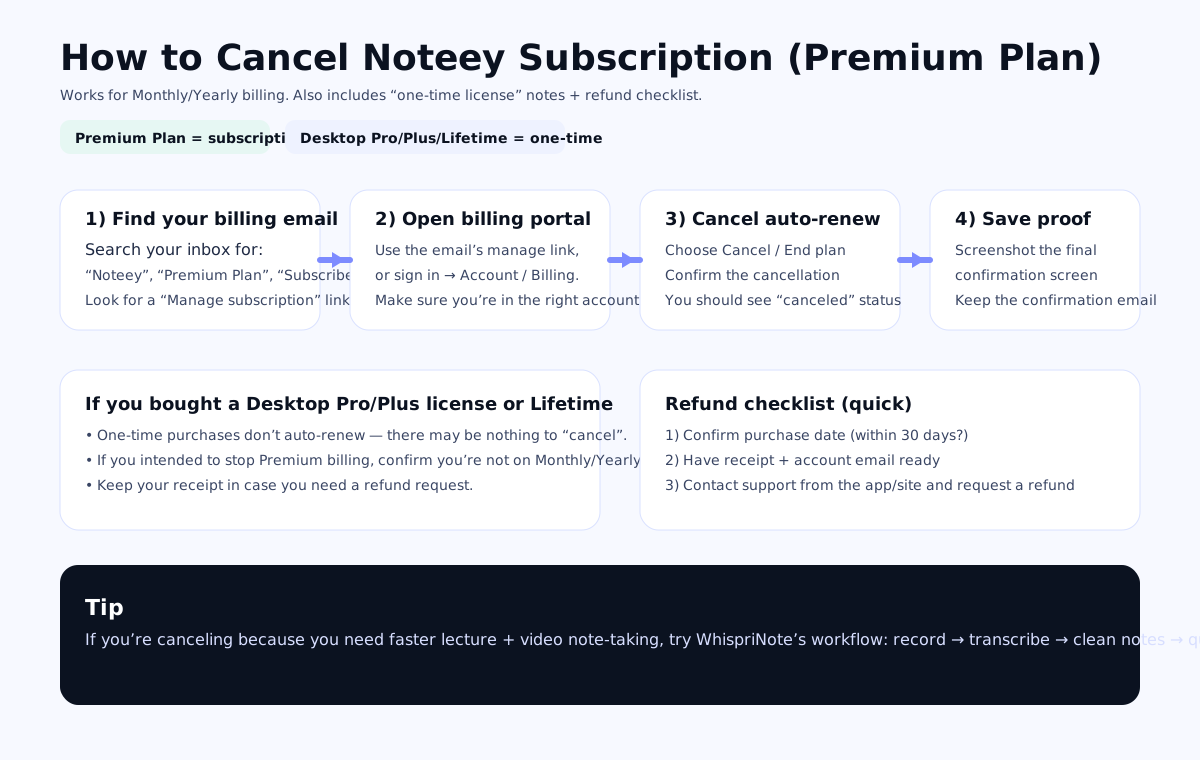
To cancel Noteey Premium Plan:
- Find your subscription or billing email and open the Manage subscription / billing portal link
- Click Cancel (or Turn off auto-renew)
- Save the confirmation screen or email as proof
If you purchased a one-time license (Desktop Pro/Plus or Lifetime), there may be nothing to cancel because it does not auto-renew.
Before you cancel: confirm what you bought
Noteey has more than one way to pay, and cancellation depends on the plan type.
1) Premium Plan (subscription)
- Bills monthly or yearly
- You want to cancel auto-renew so it does not charge again
2) Desktop Pro / Desktop Pro Plus (one-time license)
- Pay once (license)
- Usually no renewal to cancel
- If you purchased recently, you may be eligible for a refund depending on their policy
3) Lifetime (one-time)
- Typically no renewal
- Same idea: request a refund only if you are eligible
If you are unsure, open Noteey's official pricing page and compare what you bought to the plan list:
Noteey pricing (official): https://www.noteey.com/pricing
How to cancel Noteey Premium Plan (monthly/yearly)
Step 1: Find the billing email (fastest path)
Search your inbox for:
- Noteey
- Premium Plan
- Subscribe
- Receipt or Invoice
Open the most recent payment email and look for a link like:
- Manage subscription
- Billing portal
- Update payment
- Cancel plan
Step 2: Open the billing portal from the email (or account)
Once you are in the billing portal, confirm:
- You are on the correct plan (Monthly or Yearly)
- The email or account matches the one you used to pay
If you do not see a manage link:
- Sign into your Noteey account (same email you paid with)
- Look for Account, Billing, Subscription, or Plan
Step 3: Cancel auto-renew
In the billing portal:
- Click Cancel, End plan, or Turn off auto-renew
- Confirm the cancellation
You should end up on a screen that clearly shows:
- Canceled status, or
- Your plan will end on a specific date
Step 4: Save proof (do not skip this)
Do two quick things:
- Screenshot the final confirmation page
- Keep the confirmation email (or download the receipt)
Step 5: Verify it worked
To avoid surprise charges:
- Check that your subscription status says canceled
- Set a reminder for the next billing date and confirm you were not charged again
What happens after you cancel
This depends on how your subscription is set up, but typically:
- You keep access until the end of your current billing period
- After that, premium features may stop and your plan may revert to Free
The safest place to confirm the exact behavior is the final cancellation confirmation screen or email you saved.
Refunds (and how to request one)
If you cancel because you just paid and changed your mind, do this:
- Confirm your purchase date (was it recent?)
- Collect:
- the receipt email
- the account email you used
- the date and amount charged
- Contact Noteey support from the app or site and request a refund
Tip: Be specific and short:
- "Please refund my Premium Plan charge from [date]. I canceled and do not want to renew."
If you paid through a separate billing provider, refunds may have separate rules. Your receipt email will usually tell you where to request it.

