← Back to Blog

How to Cancel Fireflies.ai Subscription (2026): Step-by-Step

By WhispriNote Team
December 26, 2025
5 min read
How to Cancel Fireflies.ai Subscription (2026): Step-by-Step
WhispriNote
Try WhispriNote free
Paste a YouTube link to turn any lecture or tutorial into clean, structured study notes.

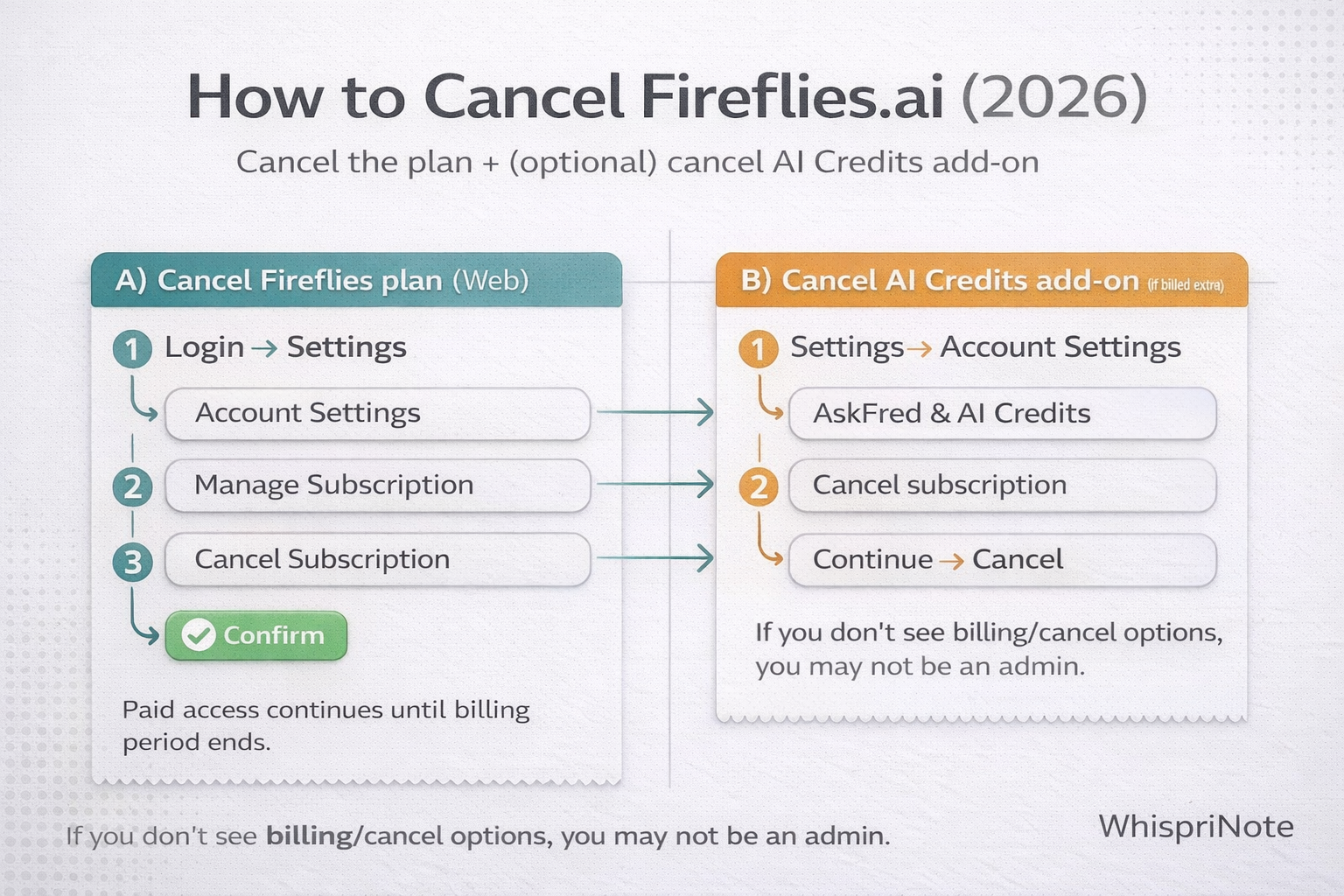
To cancel Fireflies.ai, use the web app: Settings -> Account Settings -> Manage Subscription -> Cancel Subscription. Your plan stays active until the current billing cycle ends.

If you are canceling because you want study-ready outputs (structured notes, diagrams, PDF export, voice chat), try the free workflow at YouTube-to-notes and see pricing for premium limits.

This guide covers:

  • the exact cancellation path
  • what happens after you cancel
  • the extra charge many people miss (AI Credits add-on)
  • refund eligibility basics

Quick verdict (2026)

  • Cancel in the web app and keep paid access until the billing cycle ends.
  • If you see AI Credits charges, cancel that add-on separately.
  • For study-focused notes and diagrams, start free at YouTube-to-notes.
  • For unlimited notes, longer videos, and PDF export, see pricing.

At a glance

Need Best move
Stop Fireflies renewal Cancel in the web app (Settings -> Account Settings -> Manage Subscription)
Stop AI Credits charges Cancel the AI Credits add-on separately
Keep access until term ends Yes, access remains until the cycle ends
Study notes + diagrams Try YouTube-to-notes

How to cancel Fireflies.ai subscription in 2026 (web app) and stop AI Credits add-on charges


What happens when you cancel? (quick, plain English)

  • your plan downgrades to Free at the end of your current billing cycle
  • you keep paid features until the cycle ends
  • your meetings, transcripts, and recordings remain, but Free-tier limits apply after downgrade

Source: Fireflies Help Center.


Step 1) Cancel your Fireflies plan (web app)

  1. Log in to Fireflies (web app)
  2. Click Settings (left menu)
  3. Click Account Settings
  4. Scroll to Manage Subscription
  5. Click Cancel Subscription
  6. Follow prompts -> Confirm

If you are on Business or Enterprise

Fireflies may show an option to downgrade to a lower paid plan before fully canceling. Choose the option that continues to cancellation if you want to move to Free.


Step 2) Cancel the AI Credits add-on (if you see an extra charge)

Some users see an extra charge (starting around $5 per month per user) for the AI Credits add-on if they do not cancel after its trial.

To cancel AI Credits:

  1. Settings -> Account Settings
  2. Find AskFred and AI Credits
  3. Click Cancel subscription
  4. Enter a reason -> Continue -> Cancel

"I cannot find Billing or Cancel Subscription" (common fix)

Fireflies notes that only admins can access certain billing pages. If you do not see subscription controls:

  • try the correct workspace or account
  • ask the workspace admin to cancel for you

How to confirm it actually canceled

WhispriNote
Compare plans and switch
See pricing or try the free YouTube-to-notes workflow before upgrading.

After finishing the prompts, you should see:

  • no "Renews on ..." date, or
  • a clear "canceled" or "non-renewing" state, or
  • an "ends on ..." date for the current billing period

If it still shows a renewal date, repeat the steps and make sure you completed the final confirmation.


Refunds (fast summary)

Fireflies refund policy notes eligibility by plan type and usage. Examples include:

  • full refunds may be possible within 7 days, with meeting-count thresholds (monthly vs annual differ)
  • pro-rated refunds may apply for monthly plans
  • AI Credits add-ons are not refundable

If you think you are eligible, Fireflies says to request a refund via their in-app support chat.


FAQs

Can I cancel Fireflies.ai from the mobile app?

No. Fireflies requires cancellation in the web app under Settings -> Account Settings -> Manage Subscription.

Will I lose my recordings or transcripts after canceling?

No. Your data stays in your account, but Free plan limits apply after your paid cycle ends.

How do I cancel the AI Credits add-on?

Open Settings -> Account Settings, find AskFred and AI Credits, then cancel the add-on separately.

Does Fireflies.ai offer refunds after cancellation?

Refunds depend on plan type and timing. Fireflies notes some refunds may apply within 7 days, while AI Credits add-ons are not refundable. Use in-app support to request a review.

What if I cannot see billing or cancel options?

Only workspace admins can manage billing. Switch to the correct workspace or ask the admin to cancel.


Start free with WhispriNote

Try WhispriNote - Start free with up to 5 notes.

Turn lecture audio or video into structured notes and diagrams, then review in minutes.

Or continue on the WhispriNote web app.


Keep Learning

Explore more articles on our blog.


Last updated: 2026-01-15 - Reading time: ~5 minutes

Tags:
cancel fireflies ai
fireflies cancel subscription
fireflies ai credits cancel
fireflies refund policy
← Back to All Posts