If you are searching "Otter.ai vs WhispriNote", you are probably deciding between two different outcomes:
- Meeting outcome: "I want transcripts and action items so nothing slips."
- Study outcome: "I want clean notes I can review fast before an exam."
Both tools use AI, but they are optimized for different jobs.
Competitor website (one external link): Otter.ai pricing
Quick verdict (30 seconds)
- Choose Otter.ai if your world is mostly Zoom, Teams, or Meet and you want meeting notes: transcript plus summary and action items.
- Choose WhispriNote if you need study-ready notes from lectures and videos: structured sections plus diagrams (flowcharts and mind maps) and a learning-focused review flow.
If you are a student, WhispriNote usually wins because it turns content into materials you can actually study from, not just a transcript you scroll.
At-a-glance comparison
| Category |
Otter.ai |
WhispriNote |
| Best for |
Meetings and workplace calls |
Lectures, classes, video learning |
| Typical output |
Transcript and action items |
Structured notes and visuals |
| Reading experience |
What did they say? |
What do I need to learn? |
| Visual learning |
Not the focus |
Flowcharts and mind maps |
| Great for |
Teams and follow-ups |
Students, revision, comprehension |
The core difference: transcript-first vs study-first
Otter.ai is transcript-first
Otter.ai shines when you want:
- an accurate record of a conversation
- quick summaries for sharing
- action items after a meeting
That is exactly what meeting-heavy users need.
WhispriNote is study-first
WhispriNote is built for:
- turning lecture audio or video into structured notes
- making concepts easier to understand and remember
- supporting fast review with diagrams and clear sections
This matters because learning is not just recording words, it is understanding and organizing them.
What good notes look like (both sides)
Otter-style meeting notes example
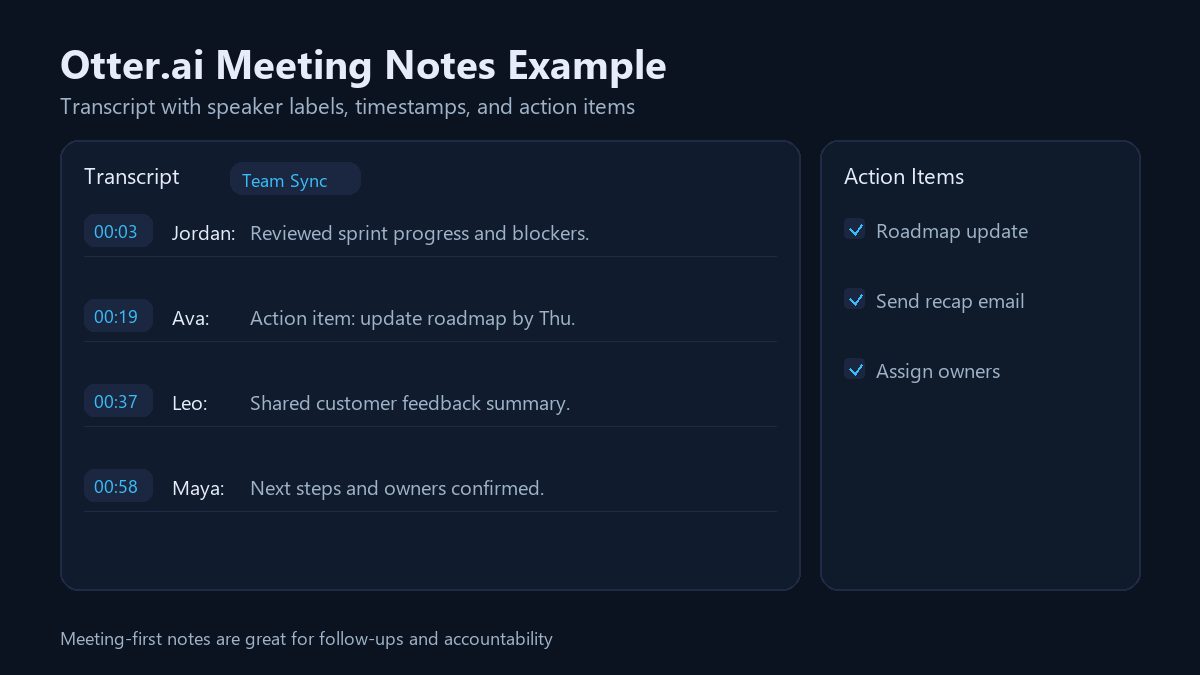
Otter-style notes are best when your next step is:
- send recap
- assign tasks
- follow up
WhispriNote study notes example
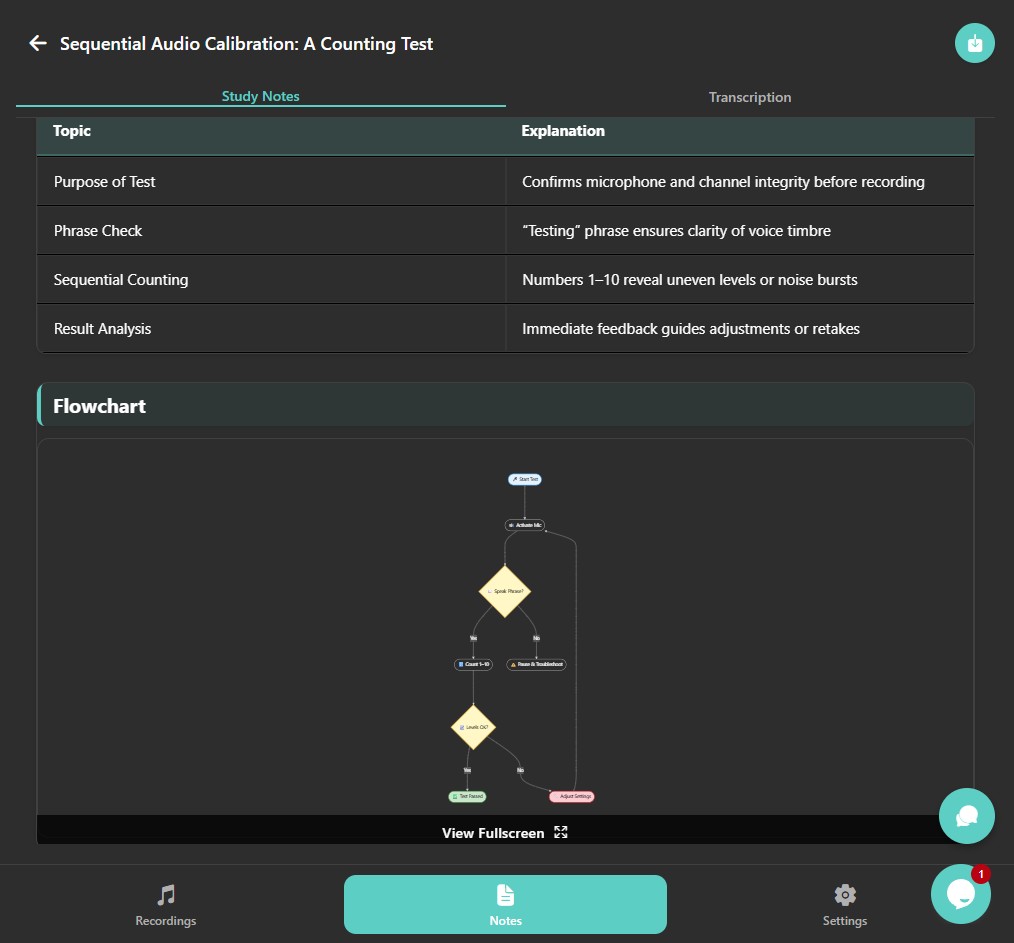
WhispriNote-style notes are best when your next step is:
- revise
- understand the concept
- remember it for an exam
Feature breakdown (what matters in real life)
1) Output quality (the can I use this test)
Otter.ai output typically works like:
- transcript
- summary
- action items
Great for meetings.
WhispriNote output is designed like study material:
- Summary (fast context)
- Key Points (what to memorize)
- Detailed Explanation (what makes it click)
- Visuals (flowcharts and mind maps)
Great for lectures and videos.
2) Visual learning (where WhispriNote usually wins)
If you learn by seeing relationships (process to steps to outcomes), visuals help a lot.
Otter.ai is not really trying to be a diagram tool.
WhispriNote is intentionally built around visual understanding:
- flowcharts for processes
- mind maps for connecting topics

That is one of the biggest reasons students finish a WhispriNote note and feel: "Okay, I actually get it."
3) Best use cases (choose based on your day)
Pick Otter.ai if you
- live in meetings
- need speaker identification and timestamps
- want action items after every call
- share notes with a team
Pick WhispriNote if you
- record lectures or classes
- learn from YouTube or tutorials
- want clean review notes for exams
- study better with diagrams
Pricing notes (2026)
Prices change, so always confirm at checkout. Here is the practical way to think about it.
Otter.ai pricing (typical structure)
Otter.ai generally has:
- a free plan with monthly minutes limits
- Pro for individuals
- Business for teams
- a student or teacher discount on Pro (with .edu emails)
WhispriNote pricing (student-friendly)
WhispriNote is designed to be easy to try before paying:
- start free and test the workflow on real lectures
- upgrade only after you have seen it produce notes you would actually study from
Learn more at WhispriNote and see WhispriNote pricing.
If you want a deeper workflow comparison, see Best YouTube to Notes Apps (Free and Paid Compared).
Honest pros and cons
Otter.ai pros
- strong meeting-first workflow
- great for recaps and action items
- useful for teams that share notes
Otter.ai cons (for students)
- a transcript can still feel raw
- less learning structure
- not built around diagrams or visual study outputs
WhispriNote pros
- notes are structured for learning (not just recording)
- visuals help concepts stick
- great review flow for exams and assignments
WhispriNote cons
- if you only want meeting transcripts and action items for a team, Otter.ai may fit better
Who wins?
If your job is meetings, Otter.ai is a great fit.
If your goal is learning faster, WhispriNote is the better choice.
Most students do not need more transcript.
They need better notes.
Get WhispriNote - Start free with up to 5 notes.
Turn lectures and videos into structured notes with diagrams in minutes.
Or continue on the WhispriNote web app.