Checked August 13, 2026: YouTube's official path is to expand the video description and select Show transcript. The option is available only when the video has captions. If it is missing, use the checks below in order.
Need the text for studying rather than YouTube's panel? Paste a caption-enabled link into the free YouTube-to-notes converter to get a timestamped transcript and summary.
The 60-second diagnosis
| What you see | Most likely cause | Best next step |
|---|---|---|
| No CC button and no Show transcript | The video has no published caption track | Try another video or ask the creator to add captions |
| CC is visible but Show transcript is missing | Page, account, app, or browser problem | Reload, expand the full description, then try a private window |
| A new upload has no captions yet | Automatic captions may still be processing | Wait and check again later |
| Transcript opens in the wrong language | A different caption track is selected | Change the language in the transcript panel |
| You own the video and captions are missing | Caption generation failed or no track is published | Check YouTube Studio → Subtitles |
Google's official transcript instructions confirm that full transcripts are available for videos that have captions.
Fix 1: Use the current Show transcript path
On desktop:
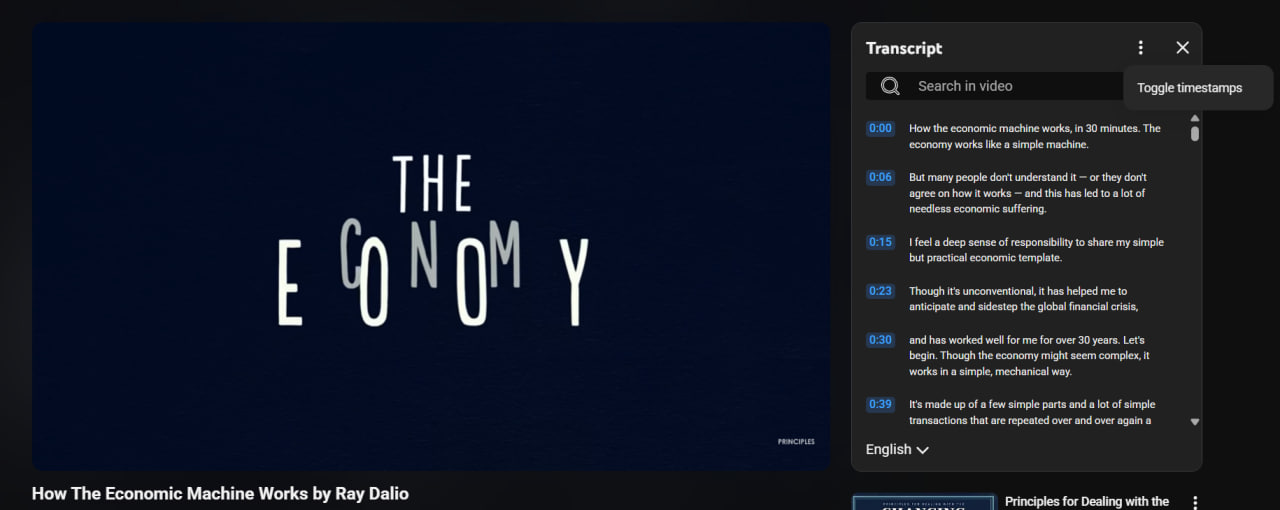
- Open the YouTube video.
- Expand the full video description.
- Select Show transcript.
- Select any transcript line to jump to that moment in the video.
You no longer need to look for a transcript command in the video's main three-dot action menu. The transcript control is in the expanded description.
Fix 2: Confirm that captions actually exist
Look for the CC icon in the video player. If it is not present, YouTube does not currently expose a caption track for that video, so it cannot display a transcript.
Captions can be created by the uploader or generated automatically. A creator can also remove or replace a caption track. Viewers cannot force YouTube to publish a transcript when no captions exist.
Fix 3: Wait for a new upload to finish processing
Automatic captions may not be ready when a video is first uploaded. YouTube says processing time depends on the complexity of the audio.
For a recent upload, check again later instead of repeatedly changing browser settings. If you own the video, open YouTube Studio → Subtitles to see whether a draft or automatic track is still processing.
Fix 4: Check the language and audio conditions
According to YouTube's automatic-caption troubleshooting documentation, automatic captions may fail when:
- the video's language is unsupported;
- the video is very long;
- the sound quality is poor;
- the opening contains a long silence;
- several speakers overlap; or
- multiple languages are spoken at the same time.
If captions exist in another language, open the transcript and use its language selector. Automatic captions normally follow the video's default language.
Fix 5: Expand the description completely
On some layouts, the first lines of the description hide the transcript control. Select more or expand the description card fully, then look for Show transcript underneath the description text.
Do this before assuming the transcript was removed.
Fix 6: Rule out an account or browser problem
If CC is available but the transcript control still does not appear:
- Reload the page.
- Open the same URL in a private or incognito window.
- Temporarily disable extensions that modify YouTube, captions, ads, or page layout.
- Clear site data for
youtube.com, then sign in again. - Try another current browser.
Testing the exact same URL matters. If it works in a private window, the video is fine and the problem is probably stored site data or an extension.
Fix 7: Use the mobile description panel
In the YouTube mobile app, open the video and expand its description. Look for Show transcript in the expanded panel. Interface placement can vary by app version and screen size.

