A YouTube video summary is helpful, but it is only the first layer. To really study, you need easy to read notes with structure, terms, and questions. This is where YouTube video to notes workflows save serious time.
This guide shows how to turn a short summary into a full revision sheet. If you need the starting point, read how to extract text from a YouTube video. You can also generate summaries directly on WhispriNote to skip the messy transcript step. If you already have a transcript, you can still use this as a YouTube transcript to notes workflow.
YouTube summary vs notes: what is missing?
| Summary | Notes |
|---|---|
| One paragraph of the main idea | Organized sections with headings |
| No definitions or examples | Key terms and explanations |
| Hard to review | Built for quick scanning |
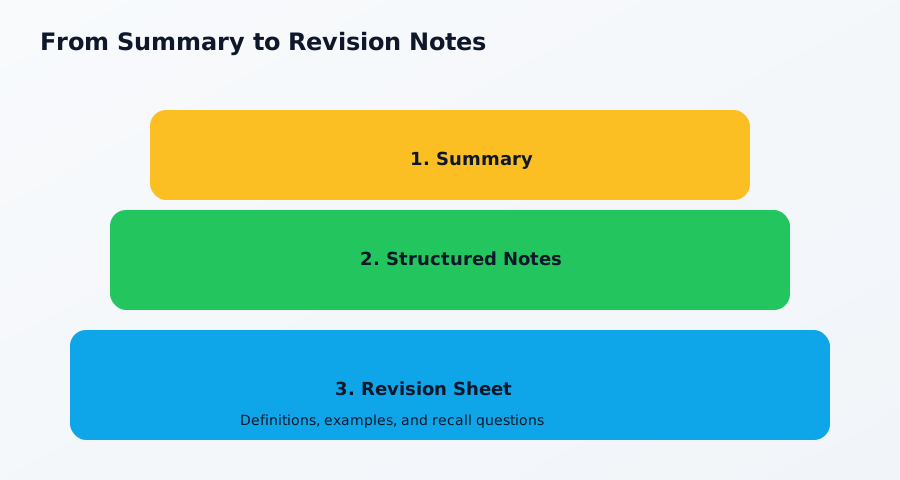
The 3-layer method
- Summary: 5-7 sentences capturing the main idea.
- Structured notes: Break the summary into sections with definitions and examples.
- Revision sheet: Add recall questions and a quick checklist.
WhispriNote creates the summary and topic outline automatically, so you can move straight to structuring and reviewing. Try it on WhispriNote if you want summaries and notes in one flow.
WhispriNote note layout (from the app)
WhispriNote follows a consistent note format inside the app. The AI output is parsed into these sections:
- Title
- Slogan (one-line benefit)
- Overview
- Key Points (table)
- Flowchart
- Summary (table)
- Timelines (only if the content is chronological)
- Detailed Explanation
- Mind Map
- Conclusion
- Next Steps
Diagram samples from WhispriNote
WhispriNote turns your notes into visual diagrams so you can review processes and relationships faster. Here is what that looks like inside a real note.
Sample flowchart

Sample mind map

Sample timeline

Build a revision sheet from any YouTube video
Use this layout to keep everything easy to review. It is a simple video to notes layout you can reuse for any subject:
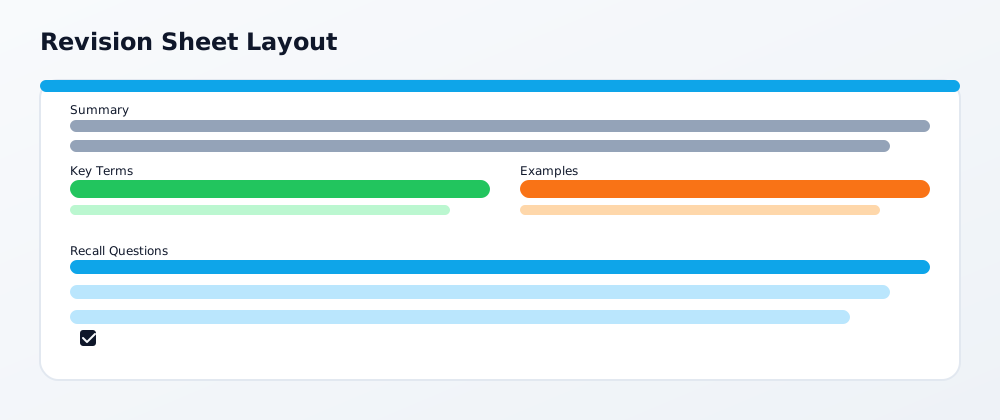
Revision sheet checklist
- Summary at the top.
- Key terms with 1-line definitions.
- Example or formula for each term.
- 3-5 recall questions at the bottom.
If you want a full workflow from video to notes, see YouTube Lecture Notes: Study Guide 2025.

