← Back to Blog

How to Study From Captions Files (SRT/VTT) (2026): Clean, Summarize, Memorize

By WhispriNote Team
December 26, 2025
5 min read
How to Study From Captions Files (SRT/VTT) (2026): Clean, Summarize, Memorize
WhispriNote
Try WhispriNote free
Paste a YouTube link to turn any lecture or tutorial into clean, structured study notes.

If your course gives you captions files (like .srt or .vtt), you already have the lecture in text form. The problem is the timestamps and broken lines make it hard to study.

This guide gives you a simple workflow that works for any class:

Clean -> Summarize -> Memorize

You will end up with:

  • readable notes (not raw captions)
  • a one page summary per topic
  • flashcards and recall prompts you can review quickly

Step 0: Get the captions file (SRT or VTT)

Common places captions files come from:

  • your video platform transcript or captions download
  • the instructor
  • accessibility services

If the download button is missing, use:

Popular platform guides:


Quick WhispriNote option (no caption import claim)

Captions are helpful, but if you have the lecture audio or video, it is often faster to start with structured output. WhispriNote can generate:

  • structured study notes (headings, key points, summaries)
  • visual diagrams (flowcharts, mind maps, timelines) for tough topics

That gives you clean material to review and convert into any study system.

WhispriNote study notes example

Structured notes make memorization and recall faster.

What is the difference between SRT and VTT?

Both are timed captions formats.

  • SRT usually looks like cue number -> timestamp line -> text lines -> blank line.
  • VTT usually starts with a WEBVTT header and uses timestamp cues too.

For studying, treat both the same: strip timing and clean the text.


The 3-step workflow (Clean -> Summarize -> Memorize)
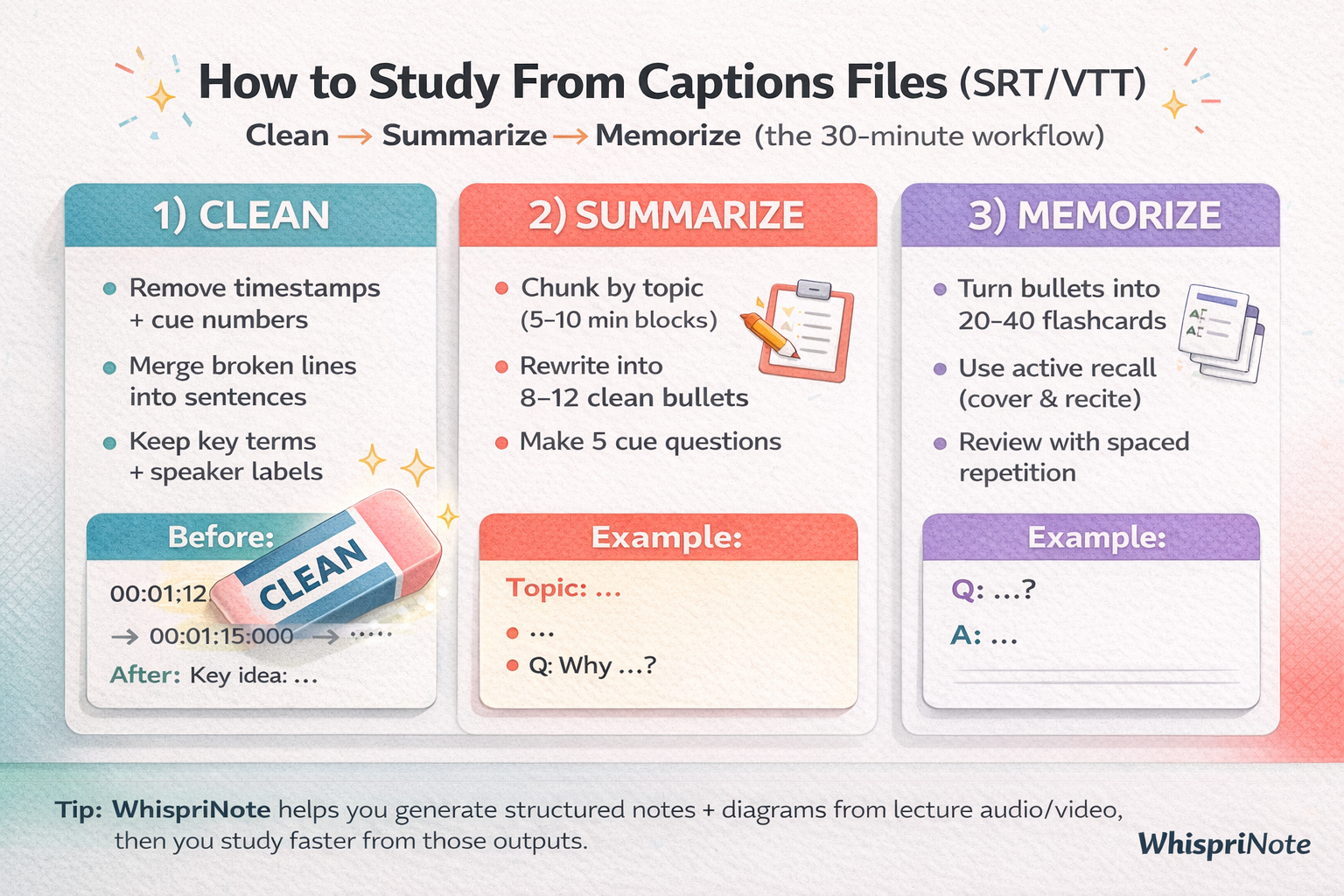
3-step method to study from captions files (SRT/VTT): clean, summarize, memorize


Step 1) Clean (5 to 10 minutes)

Goal: turn captions into readable text you can actually study.

What to remove

Remove:

  • cue numbers (common in SRT)
  • timestamp lines
  • extra blank lines
  • filler words and repeated fragments (optional)

Keep:

  • key terms
  • speaker labels (if helpful)
  • short paragraph breaks between topics

Fast cleaning method (works in any text editor)

For SRT, delete:

  • lines that are only numbers
  • lines that contain the timestamp arrow -->

For VTT, delete:

  • the WEBVTT header line (and any blank line right after it)
  • lines that contain the timestamp arrow -->

Then:

  • merge short broken lines into full sentences
  • add headings for each topic (rough headings are fine)

Do not over-clean. You are building study text, not publishing subtitles.


Step 2) Summarize (10 to 15 minutes)

Goal: convert cleaned text into testable notes.

For each topic chunk (usually 5 to 10 minutes of lecture), produce:

  1. Heading
  2. 8 to 12 bullets (clean and testable)
  3. 5 cue questions
  4. 2 to 3 sentence summary
WhispriNote
Turn this workflow into notes in minutes
Get timestamps, summaries, and study-ready outputs without pausing the video.

Bullet rules:

  • one idea per bullet
  • include definitions, contrasts, steps
  • add short "because" explanations when needed

If you want a structure, use Cornell Notes formatting:


Step 3) Memorize (10 to 20 minutes)

Reading captions is passive. Memorizing requires active recall.

Convert your summary into recall prompts:

  • flashcards (term to definition, question to answer)
  • cue questions (cover the notes and recite)
  • short practice quiz (10 to 15 questions)

If you like flashcards:

Spaced repetition (the part most students skip)

Do short reviews:

  • same day
  • next day
  • 3 to 4 days later
  • 7 days later

Even five minutes per review beats rereading the transcript for an hour.


Bonus: Use timestamps as a rewatch index

If you kept timestamps (or saved a copy before cleaning), they are useful for:

  • jumping back to the exact explanation
  • rewatching a confusing example
  • verifying a definition

Tip: keep two files:

  • lecture_clean.txt (for studying)
  • lecture_original.vtt (for timestamp lookup)

FAQ

Should I study from VTT or SRT?

Either is fine. Use whatever you can download. Clean it the same way.

How many flashcards should I make from one lecture?

A good target is 20 to 60 high quality cards. More than that usually means you are importing fluff.

My captions are inaccurate. What now?

Use captions as a guide, but prioritize slides, repeated definitions, and worked examples. If the lecture is critical, consider using the original audio or video and building structured notes from that.


Start free with WhispriNote

Get WhispriNote - Start free with up to 5 notes.

Turn lecture audio or video into structured notes and diagrams in minutes.

Or continue on the WhispriNote web app.


Keep Learning

Explore more articles on our blog.


Last updated: 2025-12-26 - Reading time: ~6 minutes

Tags:
study from srt
study from vtt
captions file study
vtt to notes
srt to notes
transcript study workflow
← Back to All Posts

