Lecture transcripts are gold, but if you leave them as a wall of text, you will read them once and forget most of it.
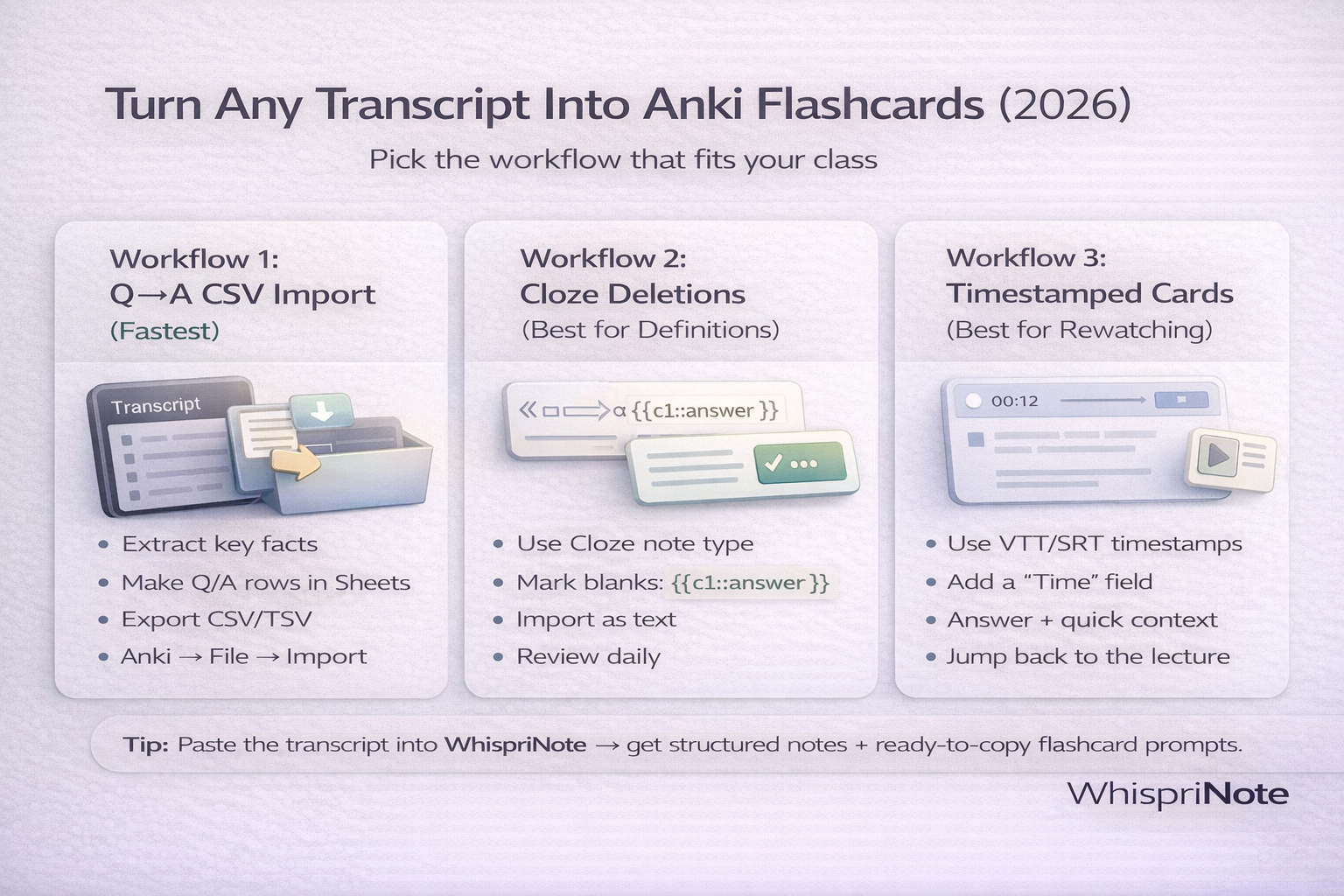
This guide gives you three practical workflows that students actually stick with:
- Q to A CSV import (fastest)
- Cloze deletions (best for definitions and processes)
- Timestamped cards (best when you need to rewatch key moments)
TL;DR (pick one)
- Want the fastest setup? Use Workflow 1 (Q to A CSV).
- Studying definitions, steps, or laws? Use Workflow 2 (Cloze).
- Need to jump back to the lecture quickly? Use Workflow 3 (Timestamped).
Step 0: Get a transcript first (TXT, VTT, or SRT)
You can start with any transcript format:
- TXT (easy to read)
- VTT or SRT (timestamps, great for rewatching)
If your transcript download button is missing, use:
If your course uses a specific platform:
- Panopto transcript download
- Kaltura transcript download
- Echo360 transcript download
- Canvas Studio transcript download
- Zoom transcript download
- Microsoft Teams transcript download
- Webex transcript download
Quick win: turn the transcript into study-ready notes first
Before you make flashcards, do this once:
- Convert the transcript into headings, key points, and definitions
- Then make flashcards from the cleaned structure
That is where WhispriNote helps. Paste transcript text and generate structured notes you can turn into flashcards in minutes.

Workflow 1: Q to A CSV import (fastest, best for most students)
This is the "I have an exam next week" workflow.
1) Extract only testable facts
From the transcript, pull:
- definitions
- cause and effect relationships
- lists and steps
- professor exam hints
2) Make a simple spreadsheet
Use columns like:
- Front (question)
- Back (answer)
- Tags (optional)
Example rows (tab-separated):
What is operant conditioning?	A learning process where behavior is shaped by reinforcement or punishment	psych101 conditioning
List the 3 parts of a neuron.	Dendrites; soma; axon	psych101 neuron
3) Import into Anki
In Anki, go to Import and choose:
- File type: text or CSV
- Delimiter: tab
- Note type: Basic (Front -> Back)
If everything lands in one field, the delimiter is wrong. Switch to tab-separated (TSV).
Workflow 2: Cloze deletions (best for definitions and processes)
This workflow is perfect for laws, formulas, and step sequences.
1) Convert statements into cloze format
Use Anki cloze syntax:
Operant conditioning is {{c1::learning shaped by reinforcement or punishment}}.
The three parts of a neuron are {{c1::dendrites}}, {{c2::soma}}, and {{c3::axon}}.
2) Import as Cloze note type
Make sure your note type is Cloze, then paste each line as a new note.
3) Keep cloze cards short
One fact per card is better than a long paragraph. Short cards are easier to recall.
Workflow 3: Timestamped cards (best for rewatching key moments)
If your transcript is VTT or SRT, you can keep timestamps on the card back.
1) Pull timestamps with key moments
Example:

